
The Ultimate 7-Step Guide To The NEW Instagram Creator Studio (Meta Business Suite) In 2025
The landscape of professional Instagram management has dramatically shifted, and if you're still looking for the old "Instagram Creator Studio," you're likely being redirected. As of late 2024 and heading into 2025, Meta has fully consolidated its creator and business tools into one powerful, centralized platform: the Meta Business Suite. This comprehensive guide will walk you through the current state of the Creator Studio and how to master its successor, ensuring your content strategy remains seamless and effective.
The original Creator Studio, a free dashboard for managing Facebook and Instagram content, has essentially been absorbed. The new unified environment is designed to streamline workflows for creators, marketers, and businesses alike, bringing advanced scheduling, a unified inbox, and deep performance insights under one roof. The key is understanding that the *functionality* you relied on hasn't disappeared—it's just moved and been upgraded.
The Essential Features of the NEW Creator Studio (Meta Business Suite)
For creators and businesses, the move to Meta Business Suite represents an evolution, not an elimination. The new platform is an all-in-one tool for managing all your Facebook, Instagram, Messenger, and WhatsApp tasks. While the name "Instagram Creator Studio" may still appear in some older guides, the definitive, up-to-date solution is the Business Suite. Here are the seven most critical features you must master for managing your Instagram presence in 2025.
1. Unified Content Management and Scheduling
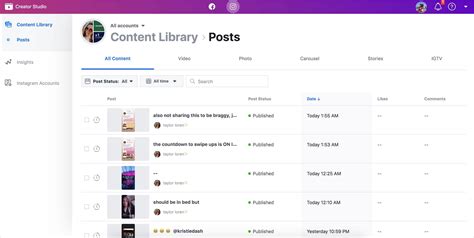
The most crucial feature inherited from the old Creator Studio is the ability to plan, create, and schedule content across both Facebook and Instagram from a single dashboard. This section of the Business Suite is your new command center for content planning.
- Post Creation: You can upload photos and videos, write captions, tag locations, and even add alt text for accessibility, all before publishing.
- Scheduling Power: The platform allows you to select a specific date and time for your posts to go live, which is vital for hitting peak engagement windows. You can schedule Feed posts, Stories, and even Reels directly.
- Drafts and Organization: Save content ideas as drafts and organize them within the Content Calendar view, ensuring a smooth, consistent publishing flow.
This centralized hub simplifies the content process, eliminating the need to switch between multiple apps or third-party scheduling tools. It supports all major Instagram content types, including IGTV, Reels, and traditional Feed posts.
2. The All-in-One Unified Inbox
One of the most significant upgrades is the Unified Inbox. This feature combines all your direct messages (DMs) and comments from both your Facebook Page and your Instagram account into a single stream.
- Efficient Engagement: You no longer need to check the Instagram mobile app for DMs and the Facebook page for comments. Everything is in one place, allowing for faster response times and better customer service.
- Comment Management: Easily filter and respond to comments on your Feed posts, Reels, and Stories, helping you manage community interaction effectively.
- Automated Responses: The inbox often includes tools for setting up automated responses or frequently asked questions (FAQs), which is a massive time-saver for growing accounts.
This functionality is key for maintaining high engagement rates and ensuring no customer or follower inquiry falls through the cracks, a vital part of topical authority.
3. Deep Performance Insights and Analytics
The analytics section in Meta Business Suite is the successor to the robust data tools found in the old Creator Studio. It provides a comprehensive look at how your content is performing.
- Audience Demographics: Understand who your followers are, including their age, gender, and location, helping you tailor your content more effectively.
- Content Performance Metrics: Track key metrics like reach, impressions, engagement rate, video views, and saves for every piece of content you publish.
- Activity Over Time: Analyze when your audience is most active and use this data to refine your post scheduling for optimal visibility.
Leveraging these performance insights is crucial for any serious creator or business. The data allows you to pivot your strategy, focus on high-performing content types (like Reels or Carousels), and continuously optimize your presence.
4. Monetization and Brand Collabs Manager
For creators, the monetization tools are a major draw. While the features can vary by region and account eligibility, the Business Suite provides access points to explore new revenue streams.
- Brand Collabs Manager: This tool helps eligible creators connect with brands for paid partnerships and sponsored content, acting as a professional matchmaking service.
- In-Stream Ads and Badges: Access to settings for various monetization options, such as In-Stream Ads for videos or Badges that fans can purchase during Live broadcasts.
The continuous updates from Meta often include new earning methods, which are typically reflected and managed within the Business Suite's creator dashboard.
Understanding the Creator Studio Migration: Why the Change?
The transition from the standalone Creator Studio to the integrated Meta Business Suite began as early as 2023, with many users being automatically redirected. The primary reason for this consolidation is to create a more efficient and powerful ecosystem for Meta's users.
Efficiency and Streamlining: Before Business Suite, creators had to manage a Facebook Page via one tool and an Instagram account via another. Business Suite brings everything—from content creation to analytics and ad management—into one unified platform. This streamlining is a huge benefit for social media managers and small business owners.
Future-Proofing: By centralizing the tools, Meta can roll out new features, like enhanced Reels support or new advertising options, simultaneously across all connected platforms, ensuring a consistent user experience and quicker feature adoption.
How to Access the NEW Instagram Creator Studio in 2025
If you were accustomed to typing "Creator Studio" into your browser, the process is now slightly different. To access the full range of Instagram management tools, follow these steps:
- Navigate to Meta Business Suite: Go directly to the official Meta Business Suite website.
- Log In: Use your Facebook login credentials associated with your business or creator account.
- Select Your Account: Ensure your Instagram account is properly connected to your Facebook Page and selected within the Business Suite dashboard.
- Find the Tools: The functionalities of the old Creator Studio are primarily located under the "Content" section (for scheduling and content calendar) and the "Insights" section (for analytics). The "Inbox" is your new home for DMs and comments.
While some users may still see a legacy link or a redirect, the best practice for professional Instagram management today is to operate exclusively within the Meta Business Suite environment.
5. Advanced Tips for Mastering the Business Suite (Creator Edition)
Beyond the core functionalities, the Meta Business Suite offers several advanced features that elevate your content game and ensure you maintain topical authority in your niche.
A. Utilize the Content Calendar: The calendar view is an underutilized feature. Use it to visualize your publishing schedule for the entire month across both Instagram and Facebook. This helps you identify content gaps and maintain a consistent posting frequency.
B. Test and Compare Post Types: Use the Insights section to run A/B tests on different content formats. Compare the performance of a Reel versus a static image post or a Carousel post to see what resonates most with your unique audience.
C. Manage Permissions and Roles: If you work with a team (e.g., a social media manager, a video editor, or an assistant), the Business Suite is where you manage access. You can grant specific permissions to team members without sharing your personal login credentials, enhancing security and workflow.
D. Integrate Advertising: The Business Suite seamlessly integrates with Meta Ads Manager. You can easily boost a high-performing Instagram post directly from the Content or Insights dashboard, turning organic success into paid reach instantly.
E. Monitor Trending Topics: Keep an eye on the "Trends" or "What's Happening" sections (if available in your region) to generate fresh content ideas based on real-time audience interest and current events, ensuring your content remains relevant and timely.
The Future of Instagram Management Tools
The consolidation into Meta Business Suite is part of a broader trend toward integrated social media management. As Meta continues to invest heavily in short-form video and monetization for creators, expect the Business Suite to receive continuous updates, especially around Reels and new earning opportunities.
For any serious creator or business, adapting to the Meta Business Suite is non-negotiable. It is the official, free, and most powerful tool provided by Meta for managing your Instagram presence. By mastering its features—from unified inbox management and content scheduling to deep performance insights—you ensure your content strategy is optimized for success in 2025 and beyond.


Detail Author:
- Name : Anibal Hodkiewicz
- Username : lwehner
- Email : twunsch@yahoo.com
- Birthdate : 1973-12-17
- Address : 54156 Reichel Club North Petechester, DE 55233-1448
- Phone : +13807327959
- Company : Bradtke and Sons
- Job : Dentist
- Bio : Vitae sint libero veritatis nobis vitae nesciunt similique. At deleniti et qui commodi sit quo. Et numquam et et nam autem asperiores. Quam est architecto dolore nostrum.
Socials
instagram:
- url : https://instagram.com/vdietrich
- username : vdietrich
- bio : Ab cupiditate qui totam quidem nihil qui fugiat. Aliquam odio est doloremque voluptas et.
- followers : 2699
- following : 483
facebook:
- url : https://facebook.com/verda_real
- username : verda_real
- bio : Non rem molestias sit sapiente sint itaque.
- followers : 114
- following : 326
twitter:
- url : https://twitter.com/verda1792
- username : verda1792
- bio : Itaque est debitis est non molestias earum. Quos sunt tempore autem voluptate. Fugiat sapiente sed sunt cupiditate. Occaecati nesciunt dolorem voluptatem ut.
- followers : 4487
- following : 2901
